 Almanac
The quickest way to learn Almanac is to type into it. Here are ten sentences that show what quick entry understands and what each one creates, followed by the commands for changing events once they're on your calendar.
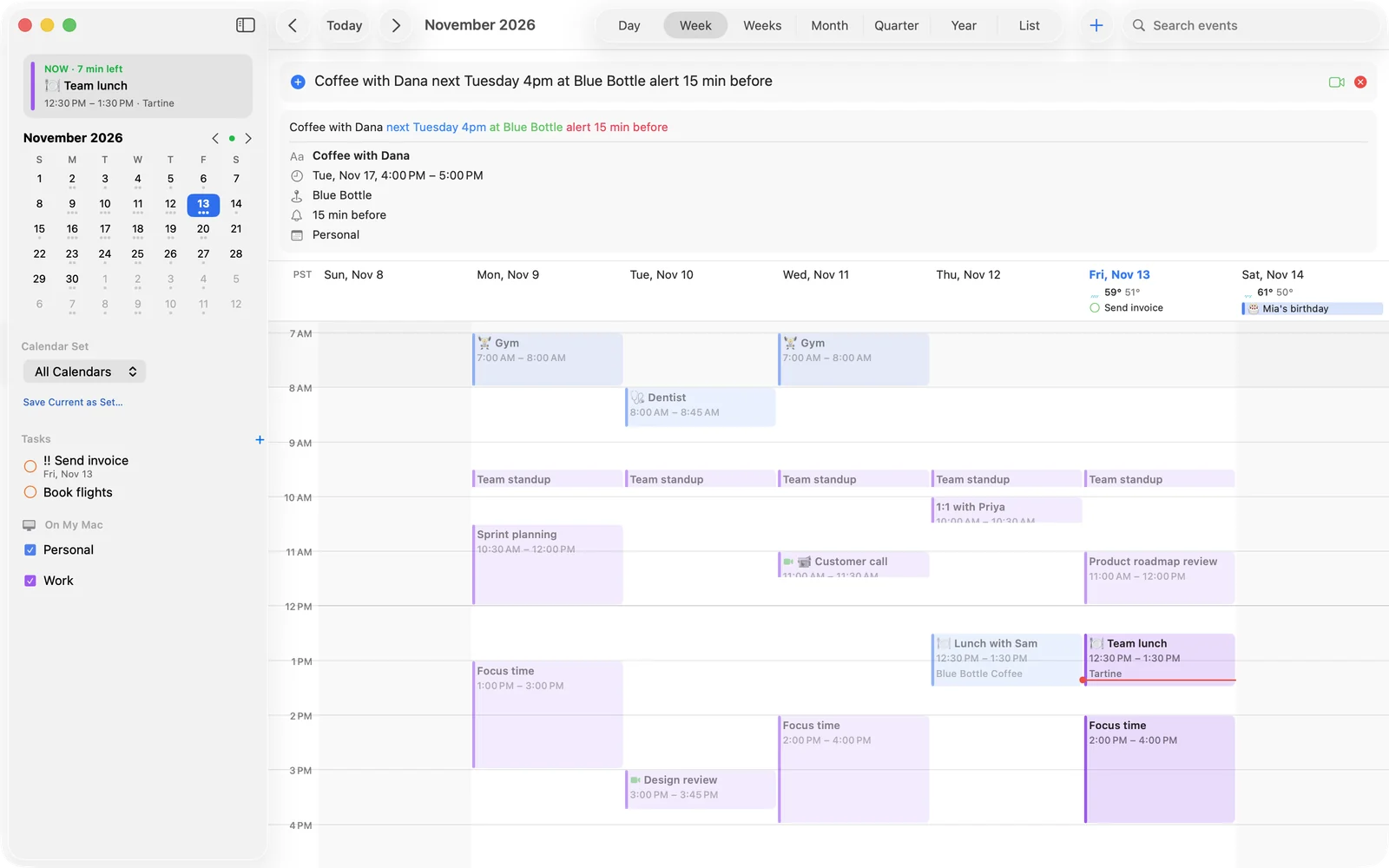
To try them, click the date in your menu bar, or press ⌃⌥Space from anywhere, and start typing. As you type, the preview shows what Almanac understood, so you can check it before you press Return.
Ten sentences
-
Lunch with Sam tomorrow 12:30-1:30pm at Blue CafeAn event called “Lunch with Sam” tomorrow from 12:30 to 1:30pm, with the location “Blue Cafe”. Almanac knows that “at” before a place name is a location, not a time.
-
Standup every weekday at 9:30am for 15 min /workA repeating event from Monday to Friday, 15 minutes long, on your Work calendar. The slash picks the calendar, and you only need the start of its name (
/familyfinds “Family Plans”). If today's 9:30 has already gone, the series starts on the next weekday. -
Flight to Lisbon Dec 3 6:15am alert 2 hours beforeAn event at 6:15am on 3 December with an alert two hours before. Words like “alert”, “reminder” and “remind me” all set alerts.
-
Conference June 5-7An all-day event across three days. If those dates have already passed this year, Almanac uses next year.
-
coffee with Dana the Tuesday after next around half past fourAn event at 4:30pm on the Tuesday after next. Relative days such as “next Friday”, “tonight” and “in 2 hours”, and spoken times such as “quarter to 9” and “4 o'clock”, all work.
-
todo send invoice friday !!A task, not an event, due on Friday with medium priority. Starting with “todo”, “task”, “remember to” or “remind me to” makes a task. You can set priority with
!,!!or!!!. -
remind me to pay rent on the 1stA task called “Pay rent”, due on the first of the coming month.
-
Pay bills every month until March 1A monthly series that ends on 1 March. Repeats can end on a date with “until”.
-
Physio every tuesday for 6 times at 4pmA weekly series at 4pm on Tuesdays that stops after six sessions. This shows the other way to end a repeat, with a count.
-
Meeting with [email protected] tomorrow at noonAn event called “Meeting” tomorrow at 12pm, with [email protected] added as an invitee. You can also write “with” and a contact's name. Invitee suggestions come from your connected accounts and your Mac's Contacts.
When you leave things out
You don't have to give every detail. If you type a time with no end, the event lasts an hour. Gym at 7 means 7 in the evening and Dinner tonight starts at 7pm. If you type no date or time at all, such as Write report, Almanac starts the event at the next hour. The preview always shows the result, so if a guess is wrong you can add the missing word before saving.
Editing by sentence
Quick entry also understands commands for events and tasks that already exist:
| Type | What happens |
|---|---|
move standup to 10am | Moves the next standup to 10am and keeps its length. |
reschedule lunch tomorrow to monday | Moves tomorrow's lunch to Monday at the same time. |
push lunch by 30 min | Moves lunch 30 minutes later. |
bring forward review by 1 hour | Moves the review an hour earlier. |
cancel gym tomorrow | Cancels tomorrow's gym session. delete works too. |
rename review to Design crit | Changes the title. |
done send invoice | Marks the task complete. complete works too. |
To find the right event, Almanac needs every word you type to appear in its title, so lunch sam matches “Lunch with Sam” but not “Team lunch”. If you name a day, it uses the event on that day. Otherwise it picks the next upcoming one. If nothing matches, quick entry tells you so instead of creating a new event called “Cancel dentist”.
Templates and search
If you set up the same kind of event often, save one as a template from its details. After that, typing # and the template's name (for example #standup) fills it in. Autocomplete suggests templates along with titles, places, calendars and contacts you've used before.
Search understands sentences as well, such as lunch with sam next week. You can narrow it down with filters: in: for a calendar, with: for a person and at: for a place, for example review in:work with:ana at:"room 4".
A few tips
- Watch the preview. It's colour-coded, so you can tell at a glance which words became the time, the place and the calendar.
- Use it from other apps. Select text and choose Services › Add to Almanac, or use the Share menu. Scripts can call
tell application "Almanac" to add "Dentist friday 3pm". - Turn on Apple Intelligence for tricky phrasing. On Macs that support it, Almanac can use Apple's on-device model to refine its reading of a sentence. It's optional, and your text is never sent to a server.
The full reference, with every date, time and repeat format, is in the typing events guide. If Almanac misreads a sentence you think it should understand, send it to us.